 Volantis Ultima Online
You can operate a ship while mounted, using the Tillerman menu's direction arrows.
Mounting and dismounting
- Double-click the closed ship door/gangplank to open it first.
- While on land, double-click the open plank again with the key in your backpack to board. Double-clicking an open plank from aboard does not move you to the plank.
- Walk onto the open plank to disembark. You move to suitable land or a dock up to 10 tiles in the direction you face. There are no separate Board or Disembark buttons.
Review the visual in real size
Health requirement
While alive, if you have taken damage that reduced your health in the last 60 seconds, you need at least 80% of your current maximum health to enter a guarded city. If you have taken no such damage in the last 60 seconds, you may enter even below this health threshold. The same city-entry rule applies to passengers crossing the boundary through ship movement or turning. Boarding a ship while alive still requires at least 80% health; the 60-second damage-free period does not waive this boarding requirement. Ghosts may enter guarded cities to resurrect. Other regional entry requirements still apply.
Management and Cashbox
Double-click the tillerman on classic ships or the helm on larger models to use the same direction arrows. All ships move at Small Ship speed. The hold opens while its key is in your backpack. The six classic models carry 15,000 weight; Orc, Gargoyle, Tokuno and Britannian models carry 50,000. Placement does not send a spare key to your bank. Single-clicking the hold shows its contents’ weight and capacity together, such as Weight: 12,000 / 15,000.
Ship control with the compass
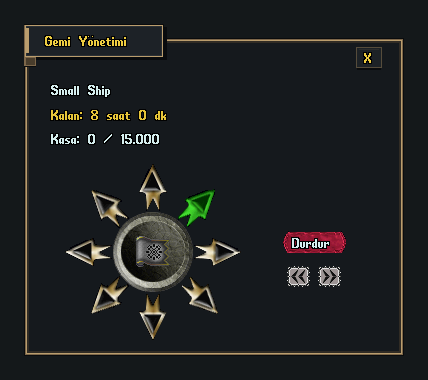
The eight arrows move the ship in the directions shown on screen. The green arrow marks the bow direction and turns with the ship. The red Stop button stops movement. The left and right buttons below turn the ship.
Refresh or remove
The six classic models last 8 hours from placement; Orc, Gargoyle, Tokuno and Britannian ships last 16 hours. The owner can renew a ship from shore by double-clicking its tillerman; the tillerman shows the remaining time. Clear the deck and passengers, remove installed cannons and resolve any sealed trade cargo before removal. A full hold opens a confirmation warning that its contents will be deleted. Confirming deletes all cargo, including containers inside the hold, returns the ship deed to your backpack and removes its keys. Canceling preserves the ship and cargo.
Shipwright modelleri
Shipwrights sell Small Ship, Small Dragon Ship, Medium Ship, Medium Dragon Ship, Large Ship and Large Dragon Ship. Orc, Gargoyle, Tokuno and Britannian ships are not sold, but previously acquired ships and deeds remain usable. Double-clicking a deed displays a message that the deed is being prepared; the placement target opens 1 second later. Use the mouse to select the silhouette’s placement center; the ship uses the selected tile as its center. The entire model needs clear open water.
When Time Runs Out
A ship that is not refreshed sinks. Players left aboard drown; blue players are sent to Britain and PK players to Buccaneer's Den. Do not leave a ship as long-term secure storage.
Sea trade and combat
Ships have 100 hit points. Sea Merchant contracts let you carry cargo between harbours, install up to two Battle Cannons and repair damage with a Ship Repair Tool and Boards. Installing and firing cannons requires 100.0 Captainship. Remove installed cannons before converting the ship into a deed.
Volantis gameplay guide during development. Characters, stock and balances shown in images are usage examples.