 Volantis Ultima Online
Savings are shared by characters on the account. Manage gold transfers and checks through the bank.
Open the bank
Say bank within 18 tiles of an eligible Banker. A wall between you does not block the bank request. Press Savings on the opened bank box. Closing the bank also closes Savings and Storage.
Review the visual in real size
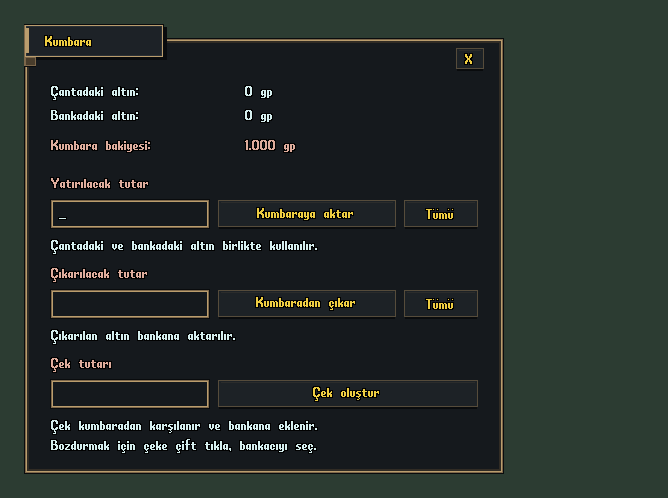
Gold, balance and check
- Transfer to Savings shows gold in your backpack and bank. Enter an amount or press All.
- Use Withdraw from Savings to transfer the amount to your bank as physical gold.
- Enter an amount under Create Check. It is deducted from your account savings balance. The check displays a formatted amount, such as 100,000 gp, and its creator's name.
- To cash a check, double-click it and target the Banker when prompted. The amount enters your account's Savings.
- GoldBackpack + Bank
- SavingsAccount-wide Balance
- CheckDouble click → Select Banker
Shopping
Savings can pay for vendor purchases. Check the displayed balance and transaction total before buying. Savings hold currency; use Storage for items.
Volantis gameplay guide during development. Characters, stock and balances shown in images are usage examples.