 Volantis Ultima Online
Load your crafted items onto a caravan, protect them along the way and earn a check worth twice the Merchant’s purchase value in the other town. If the caravan dies, its cargo remains on its corpse.
Find the Caravan Trade vendors
Caravan Trade vendors are located in Britain (1410, 1715), Trinsic (1846, 2777), Skara Brae (747, 2267) and Yew (518, 1001). Approach a vendor and double-click them. The city of the vendor you use is your departure city; the destination is chosen randomly from the other three cities. Each destination has 10 different routes, giving each departure city 30 possible routes in total. The destination and route are chosen when the journey begins and remain fixed throughout the journey and after logging back in. The white name above the caravan identifies the character who started the journey. Caravan Trade and Merchant vendors have profession signs above their names.
Load goods through the menu
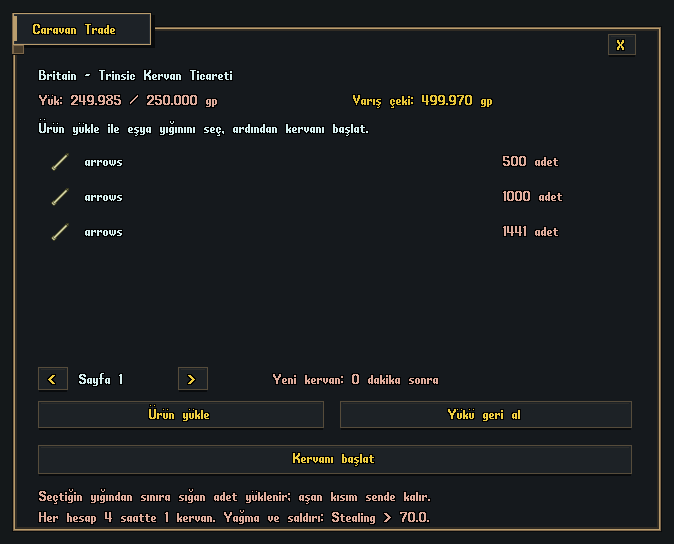
- Double-click the Caravan Trade vendor. No deed is needed; an account has a single cargo record.
- Press Load goods and target an item in your normal backpack or bank chest. There is no quantity entry: the entire selected stack is loaded. If the stack would exceed the 250,000 gp limit, only the quantity that fits is taken; the rest stays in place. If even one item will not fit, the item is not moved.
- Only verifiable products crafted through the player’s crafting menu and accepted by the Merchant can be used. Newbie/blessed items, filled containers, purchased items and items without a crafting record are rejected.
- Check the Cargo and Arrival check amounts in the menu. If you change your mind before departure, use Retrieve cargo beside the vendor to transfer the products to your shared bank storage.
Limits and payment
The value uses the server’s Merchant purchase calculation, not the item’s Player Vendor price, and is checked again at departure. For example, cargo worth 120,000 gp to the Merchant earns a 240,000 gp check on successful arrival. Logging out does not prevent payment. Redeem the check through a banker to transfer it to Savings.
| Kural | Value |
|---|---|
| Cargo value at the Merchant’s purchase prices | En fazla 250.000 gp |
| Check for successful arrival | Twice the cargo value; up to 500,000 gp |
| Cargo entries | Up to 128 items/stacks |
| Starting a new caravan | Once every 4 hours per account |
| Active caravans per account | 1 |
| Reward location | An actual check in the account’s shared bank storage |
Protect the caravan

The caravan walks along its selected route; the journey time depends on the selected route. There are 10 evenly spaced attack waves along the route. Each wave has 1 Fencer, 1 Swordsman and 1 Archer, for 3 raiders per wave and 30 raiders over the journey. Each raider has STR 100, DEX 100 and INT 25. Raiders focus on the caravan and keep pursuing it even if someone else attacks them or their health drops. Raiders are automatically removed if their attack is cleared, they fall more than 24 tiles behind, or they are more than 8 tiles away and fail to advance for 12 seconds. There is no stop or wait command; the caravan can pass through players and NPCs. Freezing and control spells do not stop it. Field and Wall spells cannot block its route; the caravan passes through them and field effects do not affect it. Intercept the attackers along the way to keep the caravan alive.
Other players and looting
- Only players outside the account that started the trade and with a base Stealing skill of at least 70.0 may attack the caravan; exactly 70.0 is enough. The owner cannot attack their own caravan. The responsible owner’s skill and account are also checked for physical attacks, spells and pet/summon attacks.
- The account that started the trade or players with Stealing above 70.0 may access a dead caravan’s cargo. The same permission applies to items nested inside the corpse.
- If the caravan dies, the menu returns to No registered cargo and Retrieve cargo is unavailable. The products can only be taken from the corpse. No arrival check is issued, and surviving attackers associated with that caravan are removed. Death does not reset the four-hour cooldown.
- Attacking NPCs cannot be looted; their equipment is marked newbie.
- Cargo cannot be added or withdrawn after departure. At arrival, the caravan and transported goods are removed and payment is issued once.
If you log out during the journey
Cargo, route progress and the cooldown are saved on the server. Switching characters does not remove the four-hour limit. The caravan continues while its owner is offline. Check its status through the Caravan Trade menu after logging back in.
Volantis gameplay guide during development. Characters, stock and balances shown in images are usage examples.